
Contoh Pengunaan
- User request buat sebuah repo yang berisi Locustfile, semua konfigurasi Locust (jumlah worker, script, environment) di setup via Github Actions
Catatan Penting
Manual workflows hanya bisa jalan di branch default
Type environment ini di dapat dari menu “Environment”
name: Run Locust
on:
  workflow_dispatch:
    inputs:
      #setup this at settings->environment
      environment:
        description: "Choose deployment environment:"
        type: environment
        required: true
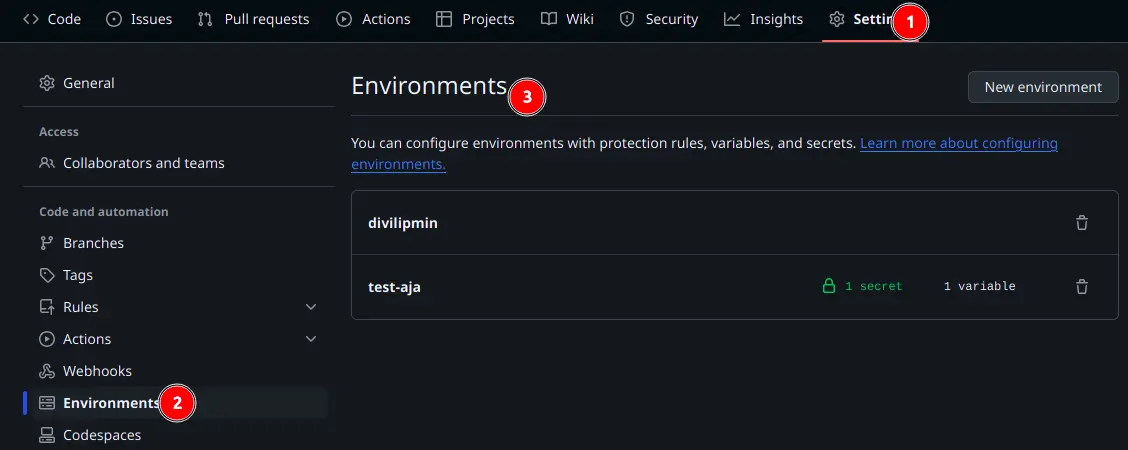
Environment Menu
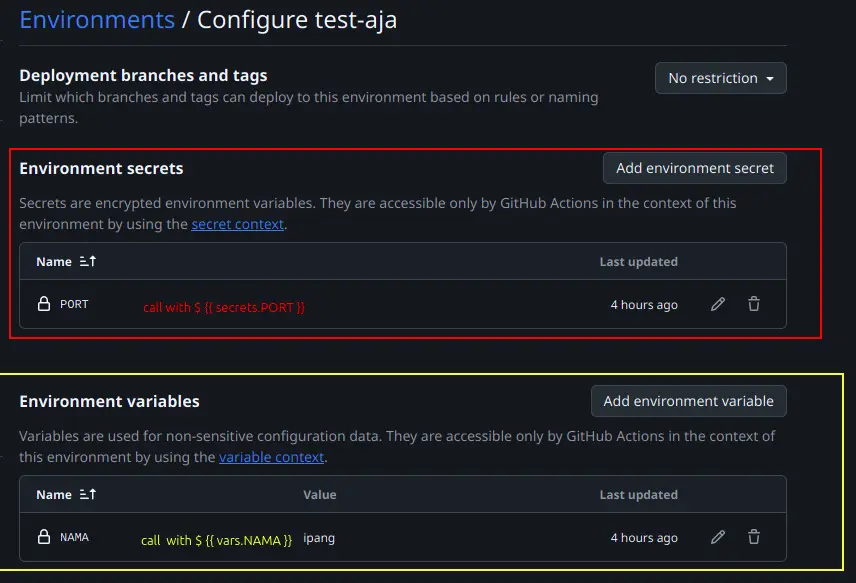
Cara Memanggil Variables & Secrets
How To
- Buat Locust
docker-compose.yml
name: locust
services:
  master:
    image: locustio/locust:latest
    ports:
      - "8809:8089"
    volumes:
      - ./:/mnt/locust
    environment:
      LOCUST_FILE: ${LOCUST_FILE:-default_locustfile.py}
    command: -f /mnt/locust/${LOCUST_FILE} -t 5m --master -H https://ipang.my.id

  worker:
    image: locustio/locust:latest
    volumes:
      - ./:/mnt/locust
    environment:
      LOCUST_FILE: ${LOCUST_FILE:-default_locustfile.py}
    command: -f /mnt/locust/${LOCUST_FILE} --worker --master-host master
- Buat locust.yml untuk workflows Github Actions
name: Run Locust
on:
  workflow_dispatch:
    inputs:
      #setup this at settings->environment
      environment:
        description: "Choose deployment environment:"
        type: environment
        required: true

      worker_size:
        description: "How much worker do you need?"
        required: true
        default: "5"
        type: choice
        options:
          - 5
          - 10
      locustfile:
        description: "Specify the Locust file to use (e.g., locustfile1.py):"
        required: false

jobs:
  run-locust:
    runs-on: self-hosted
    environment: ${{ github.event.inputs.environment }}
    steps:
      - name: Run Locust
        env:
          WORKER_SIZE: ${{ github.event.inputs.worker_size }}
          LOCUST_FILE: ${{ github.event.inputs.locustfile }}
        run: |
          #stop all container with locust name
          docker ps -a --filter "name=locust" --format "{{.ID}}" | xargs docker stop
          #create new variable so the docker-compose can read that
          export LOCUST_FILE=$LOCUST_FILE
          docker-compose up --scale worker=$WORKER_SIZE -d --remove-orphans
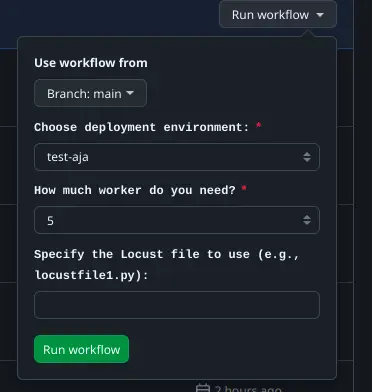
Contoh Workflows yang Sudah Jalan
Referensi: