
Catatan
Gunakan versi PHP sudah di support oleh Laravel
Jangan lupa install PHP extensions
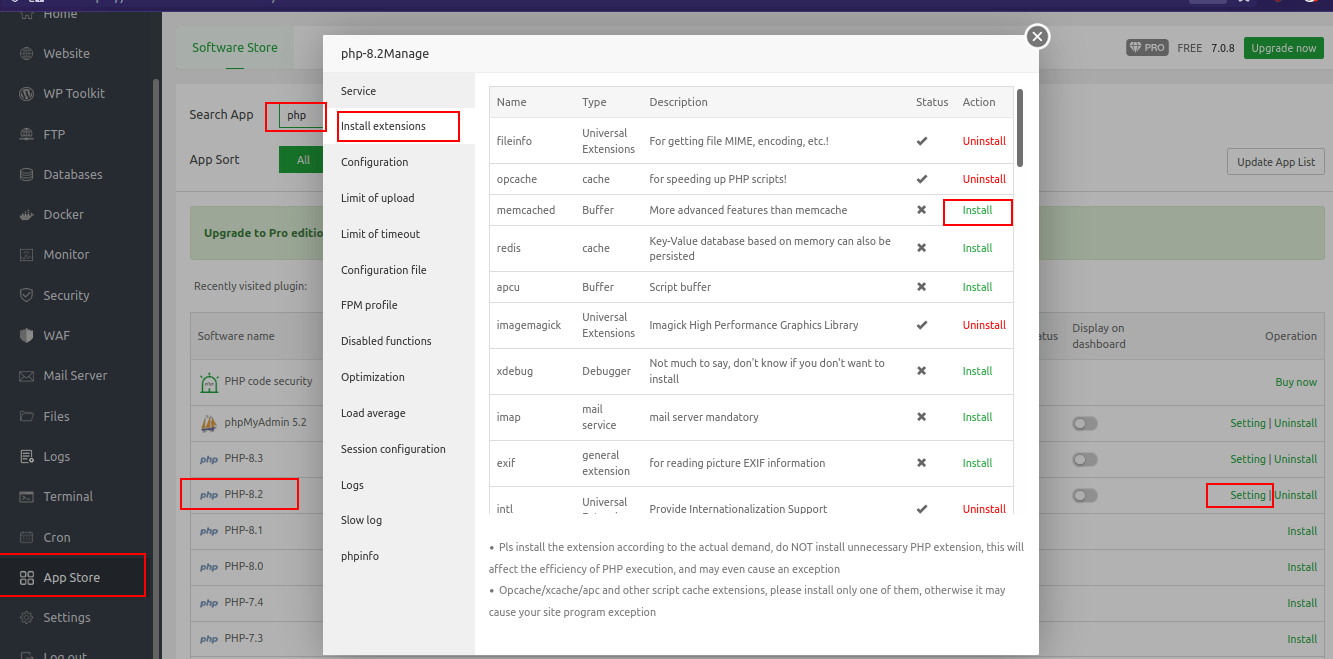
Install PHP Extensions aaPanel
aaPanel menginstall PHP dari source (bukan
apt) jadi jika extensions yang kamu perlukan tidak ada, kamu perlu menginstall dari sourceAgar lebih mudah, jalankan
composer installdannpm run proddi local, lalu kamu compress direktori project dengantar.gz. Nanti tinggal upload dan extract file di aaPanel
How To
Pastikan kamu sudah upload project di root dir project aapanel
Copy
index.phpyang ada di direktori public ke root folderHapus
../diindex.php
<?php

use Illuminate\Contracts\Http\Kernel;
use Illuminate\Http\Request;

define('LARAVEL_START', microtime(true));

/*
|--------------------------------------------------------------------------
| Check If The Application Is Under Maintenance
|--------------------------------------------------------------------------
|
| If the application is in maintenance / demo mode via the "down" command
| we will load this file so that any pre-rendered content can be shown
| instead of starting the framework, which could cause an exception.
|
*/

if (file_exists($maintenance = __DIR__.'/storage/framework/maintenance.php')) {
    require $maintenance;
}

/*
|--------------------------------------------------------------------------
| Register The Auto Loader
|--------------------------------------------------------------------------
|
| Composer provides a convenient, automatically generated class loader for
| this application. We just need to utilize it! We'll simply require it
| into the script here so we don't need to manually load our classes.
|
*/

require __DIR__.'/vendor/autoload.php';

/*
|--------------------------------------------------------------------------
| Run The Application
|--------------------------------------------------------------------------
|
| Once we have the application, we can handle the incoming request using
| the application's HTTP kernel. Then, we will send the response back
| to this client's browser, allowing them to enjoy our application.
|
*/

$app = require_once __DIR__.'/bootstrap/app.php';

$kernel = $app->make(Kernel::class);

$response = $kernel->handle(
    $request = Request::capture()
)->send();

$kernel->terminate($request, $response);
- Cek
.env, pastikanAPP_URLsudah benar, lalu tambahkan variabel baruASSET_URL=public(source: Stackoverflow - How do I upload a laravel project on cPanel shared hosting? )