
Before You Follow This Tutorial
Please read my previous post, because it will be to long if I describe all in this post
I posted about how to compress file (image, PDF, dll) at S3 bucket without lambda . Now, I want to share how to live compress PDF at your bucket S3
Docker volume using NFS, you can read how to allow user to write in S3 mounted folder
Tools that I Used in This Tutorial
watchexec - a simple, standalone tool that watches a path and runs a command whenever it detects modifications.
goofys - to mount S3 bucket/DO Spaces on folder
ghostscript - to compress/reduce PDF size without lose quality
python - to run python script of course.
screen (optional)Ubuntu server
How To
Mount S3 bucket to folder using goofys
I got compress pdf script from github.com/ilovefreesw . I modified it little bit, to match our requirement. You can call this script
compress.py
from __future__ import print_function

import os
import subprocess
import shutil

SOURCE_DIR = "/mnt/yourBucket/pdf/"
DEST_DIR = "/mnt/yourBucket/compressed-pdf/"
TMP_SOURCE_DIR = "/tmp/compressedtmp"


try:
   os.mkdir('/tmp/compressedtmp')
except FileExistsError:
   pass

for file in os.listdir(SOURCE_DIR):
      if file.endswith(".pdf"):
         filename = os.path.join(SOURCE_DIR, file)
         arg1= '-sOutputFile=' + '/tmp/compressedtmp/' + file
         print ("compressing:", file )
         p = subprocess.Popen(['gs', '-sDEVICE=pdfwrite', '-dCompatibilityLevel=1.4', '-dPDFSETTINGS=/screen', '-dNOPAUSE', '-dBATCH',  '-dQUIET', str(arg1), filename], stdout=subprocess.PIPE).wait()

#move from tmp folder to compressed folder
for fname in os.listdir(TMP_SOURCE_DIR):
    if fname.lower().endswith('.pdf'):
        shutil.move(os.path.join(TMP_SOURCE_DIR, fname), os.path.join(DEST_DIR, fname))


#remove original pdf at /pdf/
for original_pdf in os.listdir(SOURCE_DIR):
    if original_pdf.lower().endswith('.pdf'):
        os.remove(os.path.join(SOURCE_DIR, original_pdf))
- Create new systemd service
/etc/systemd/system/pdf-compress.service
[Unit]
Description=Compress PDF on S3 bucket

[Service]
User=deployer
WorkingDirectory=/home/yourUser/scripts/compress-pdf
ExecStart=watchexec -W -d 1 -w /mnt/yourBucket/pdf/ --exts pdf python3 compress.py --force-poll 1
Restart=on-failure
RestartSec=5
StartLimitInterval=60s
StartLimitBurst=3
Type=simple
TimeoutStartSec=0
RemainAfterExit=yes
StandardOutput=file:/var/log/compress/pdf/access.log
StandardError=file:/var/log/compress/pdf/error.log

[Install]
WantedBy=default.target
Reload daemon
sudo systemctl daemon-reload. You have to reload daemon everytime you modified .service fileStart our new service
sudo systemctl start pdf-compress.servicethen check usingsudo systemctl status pdf-compress.service
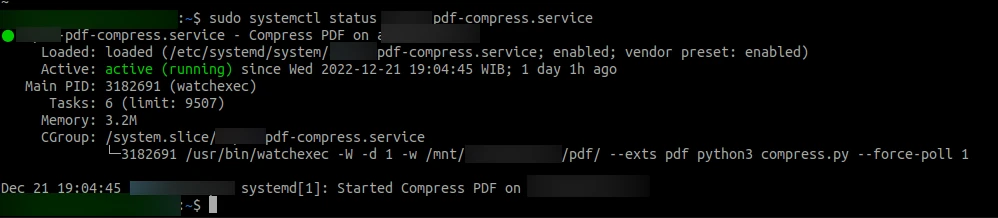
Live PDF Compress Service was Running
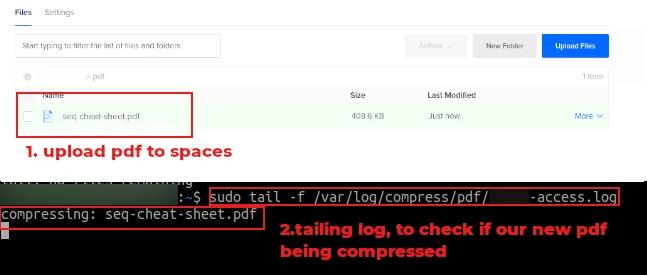
Live Compression was Working!

Jika kamu merasa tulisan ini bermanfaat & membantu kamu, kamu bisa berdonasi lewat saweria
If you feel this website help you, you can donate at saweria