
Lelah ngetik docker ps -a untuk mengecek apakah images terbaru sudah di pull atau belum, yuk kita coba setup notifikasi slack pada watchtower
Buat app baru di slack
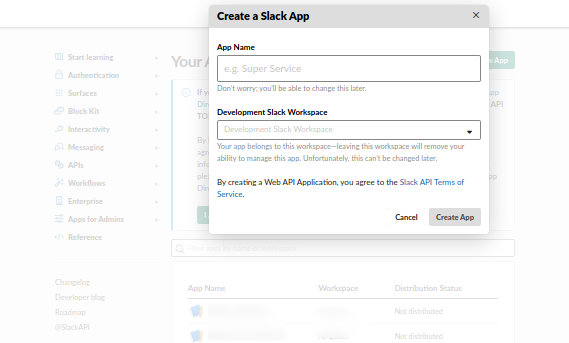
Membuat App Baru di Slack
Pilih Incoming Webhooks
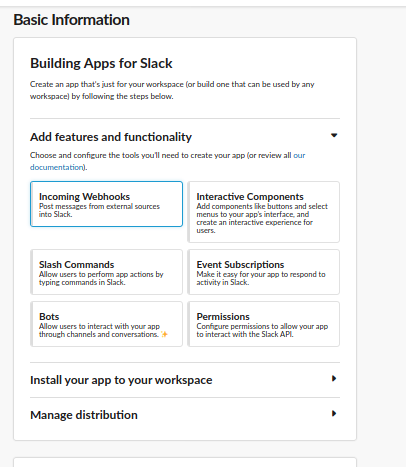
Pilih Incoming Webhooks
Buat Webhook URL baru, lalu copy URL tersebut
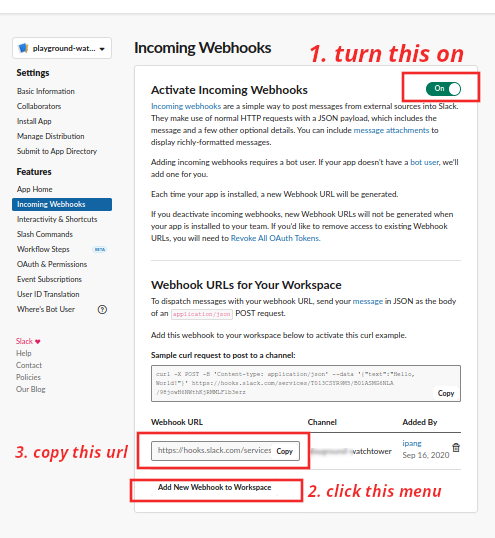
Webhook Berhasil di Buat
Masuk ke server yang sudah di deploy watchtower, stop dan hapus container watchtower yang ada. Lalu ketikan
docker-compose -f docker-compose-dev.yml up --force-recreate -d kafdrop
docker run -d --name towerpenjaga-update \
-v /var/run/docker.sock:/var/run/docker.sock \
-e WATCHTOWER_NOTIFICATIONS=slack \
-e WATCHTOWER_NOTIFICATION_SLACK_HOOK_URL="https://hooks.slack.com/services/tokenunikwebhookurlanda" \
-e WATCHTOWER_NOTIFICATION_SLACK_IDENTIFIER=watchtower-update \
-e WATCHTOWER_NOTIFICATION_SLACK_CHANNEL=#channel-yang-dibuat-di-slack \
-e WATCHTOWER_NOTIFICATION_SLACK_ICON_EMOJI=🐳  containrrr/watchtower namakontaineryangharusdiawasiwatchtower tulissatupersatu yanginiberartiyangketiga
- Jika sudah benar, maka akan ada notifikasi setiap ada images baru yang di pull oleh server
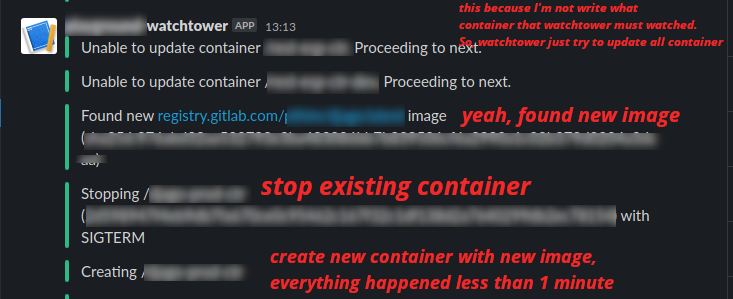
Contoh Notifikasi Watchtower