
Someone in percona blog got a nice way to fix that error fixing a mysql 1045 error. In my case, I got error when using Percona 8 (based on mysql 8). Here is the step:
Stop the instance,
service mysql stopEdit my.cnf, add skip-grant-tables
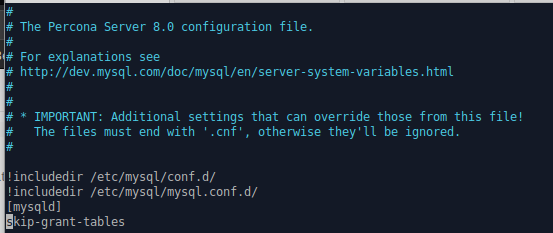
Add to my.cnf File
Start the instance,
service mysql startLogin using
mysql -u root -pHere is the interesting, in that blog you have to use
“UPDATE mysql.user SET authentication_string=PASSWORD(‘newpwd’) WHERE User=’root’ and Host=’localhost’;”. but that not working anymore, you will got ERROR 1064 (42000): You have an error in your SQL syntax; check the manual that corresponds to your MySQL server version for the right syntax to use near ‘(newpd).
To fix that we can use the “old way” ,ALTER USER 'root'@'localhost' IDENTIFIED BY 'password';Stop the mysql service
Remove skip-grant-tables at my.cnf file
Start mysql service and try login as root using new password.